Automate Preventive Maintenance in 5 Minutes with MaintainNow
Set a PM schedule once and MaintainNow creates the work orders, sends them to your technicians' phones and flags anything overdue. See it in 4 screens.
In about 5 minutes you'll have:
- a recurring PM schedule for any piece of equipment
- work orders that create themselves days before they're due
- technicians who get the job, with a checklist, on their phone
- one dashboard card showing which PMs are overdue
Start free and set up your first PM plan → There's a free plan, so you can try this with your own equipment.
Before and after
Without a CMMS, preventive maintenance depends on someone remembering: a spreadsheet, a calendar reminder, a sticky note on the boiler room door. When that person is busy or on vacation, the PM slips and nobody notices until something breaks.
With MaintainNow, you set the schedule once. The work order appears on time, goes to the right technician, and if it isn't done the dashboard shows it in red.
1. Set the schedule once
Create a Maintenance Plan, choose how often it repeats (here, every 3 months on the 1st) and how many days early the work order should appear. A week's notice leaves time to order filters or parts.
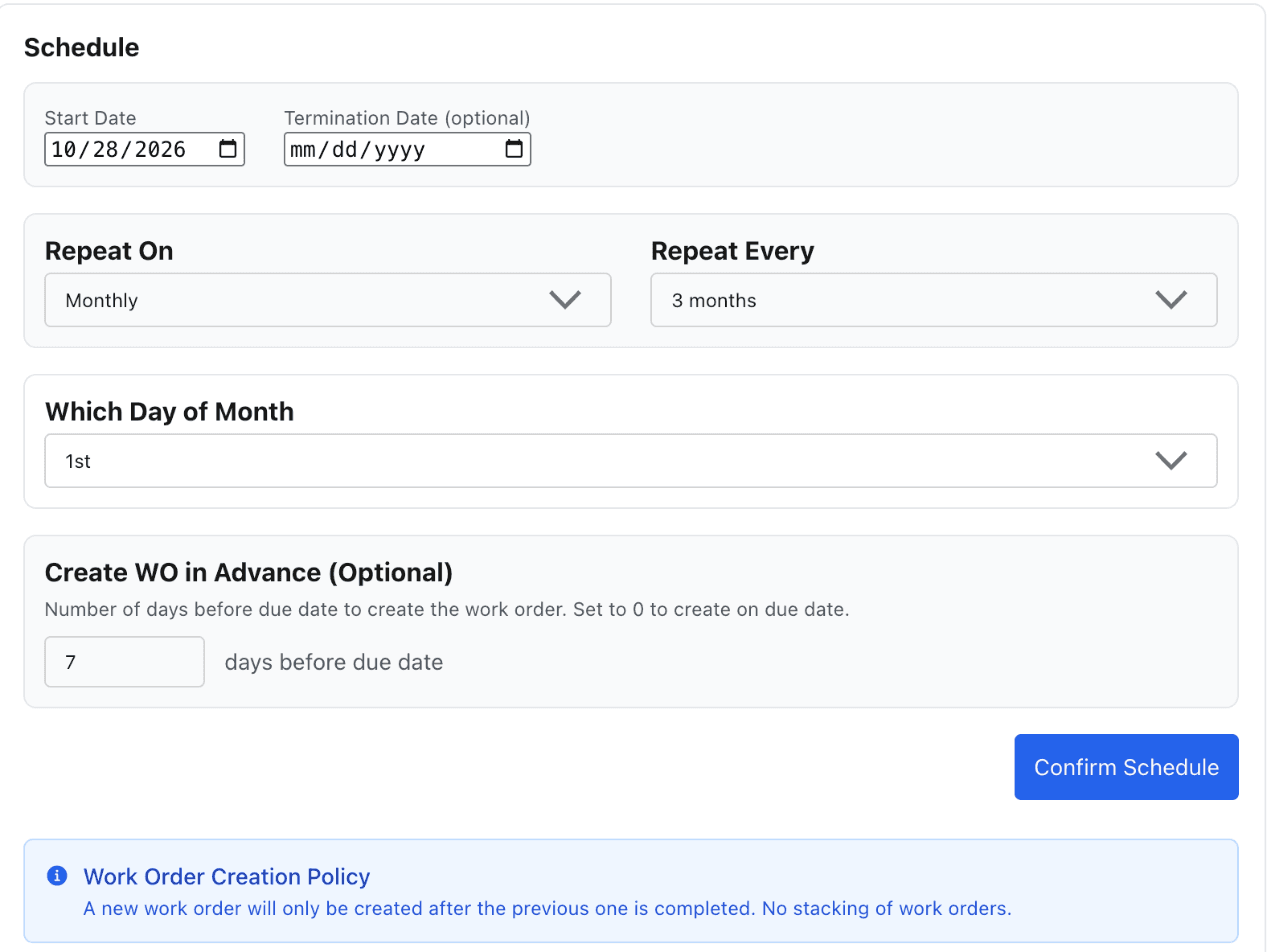
Link the equipment and pick the technician, and you're done. From now on MaintainNow does the remembering.
2. Work orders arrive on your technicians' phones
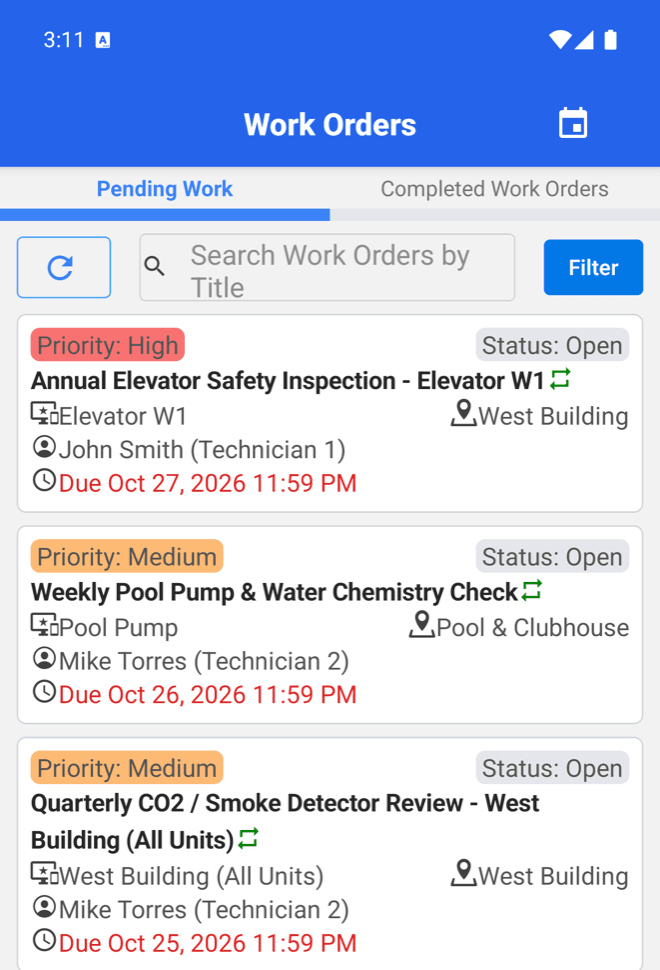
Each PM work order shows up in the technician's Work Orders list in the MaintainNow mobile app, with its priority, equipment, location and due date. The repeat icon marks work generated by a maintenance plan, and overdue dates turn red.
3. Technicians complete the checklist on site
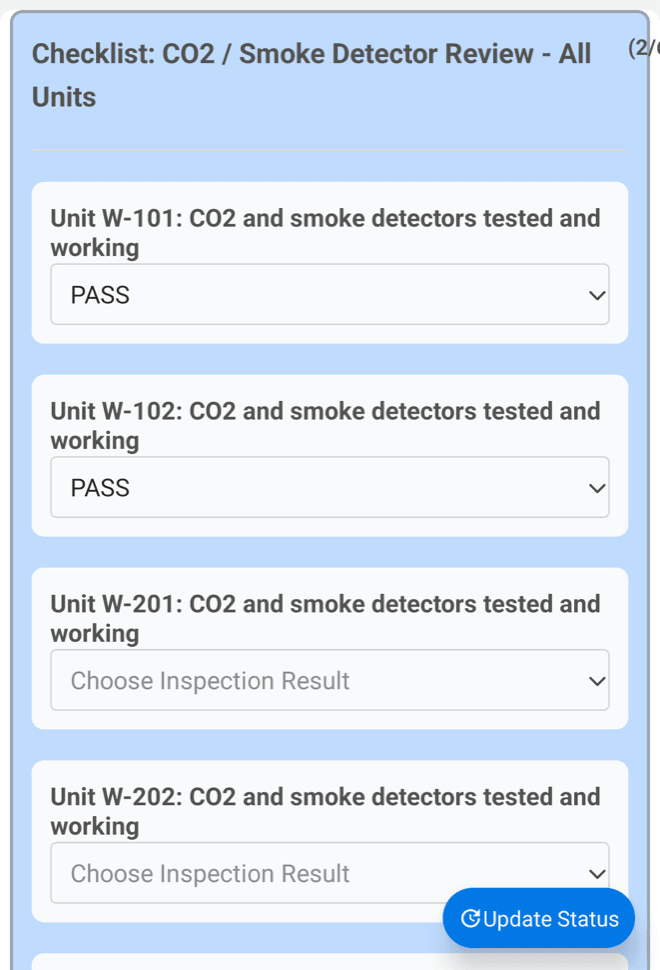
Attach a checklist template to the plan and every work order carries it. Technicians record Pass, Fail or Flag for each item right at the equipment, so nothing gets skipped and there's a record of every inspection.
4. See what's slipping at a glance
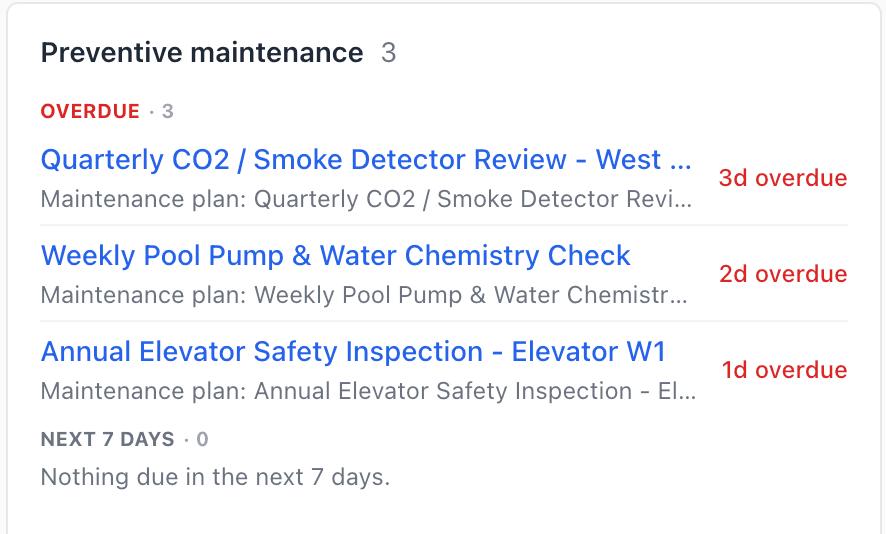
The Preventive maintenance card on the Home dashboard lists every overdue PM and what's due in the next 7 days, so you can follow up before a missed inspection turns into a breakdown or a failed audit.
Questions people ask
Can MaintainNow create preventive maintenance work orders automatically?
Yes. A maintenance plan creates each work order on a schedule you choose (daily, weekly, monthly or yearly) and can create it a set number of days before the due date.
What happens if a PM isn't completed in time?
The next work order isn't created until the current one is completed, so overdue PMs don't pile up as duplicates. Overdue work is flagged in the app and on the dashboard.
Can one plan cover several pieces of equipment?
Yes. Link multiple assets and MaintainNow creates one work order per asset, so each one has its own history.
Do technicians need a computer?
No. Technicians see and complete their work orders and checklists in the MaintainNow mobile app.
Want every setting explained?
This page shows the highlights. For a field-by-field walkthrough of the maintenance plan screen, see How to Set Up a Preventive Maintenance Plan in MaintainNow (Step-by-Step).
Stop relying on reminders
Set up your first preventive maintenance plan in about five minutes. Start free with MaintainNow →
Set this up in your own facility
Start a free MaintainNow trial and follow these same steps with your own equipment.
Download the Mobile App:


✅ No credit card required • ✅ 30-day money-back guarantee • ✅ Setup in under 24 hours