Create and Assign a Work Order in Under a Minute with MaintainNow
Log a repair from your phone, assign it to a technician and track it to done. One screen, one tap to save, and the office sees it instantly.
In about a minute you'll have:
- a work order logged from your phone, right where the problem is
- the right technician assigned, with a priority and a due date
- live status updates as the job moves from Open to Completed
- the same job on the office dashboard, the moment it's saved
Start free and create your first work order → There's a free plan, so you can try it with your own team today.
Before and after
Without a CMMS, repairs arrive by phone call, text, hallway conversation or sticky note. Someone has to remember who's handling it, and the only way to know if it's done is to ask. Jobs slip, and nobody can say how long anything took.
With MaintainNow, every repair becomes a work order with an owner, a priority and a due date. Technicians see it on their phone, update it as they go, and managers see everything in one place without chasing anyone.
1. Log it from your phone
In the MaintainNow mobile app, open Work orders and tap + Add Work Order. Only the Work Order Title is required. Add a description, set the Priority and pick the Asset. You can also attach Images of the problem.
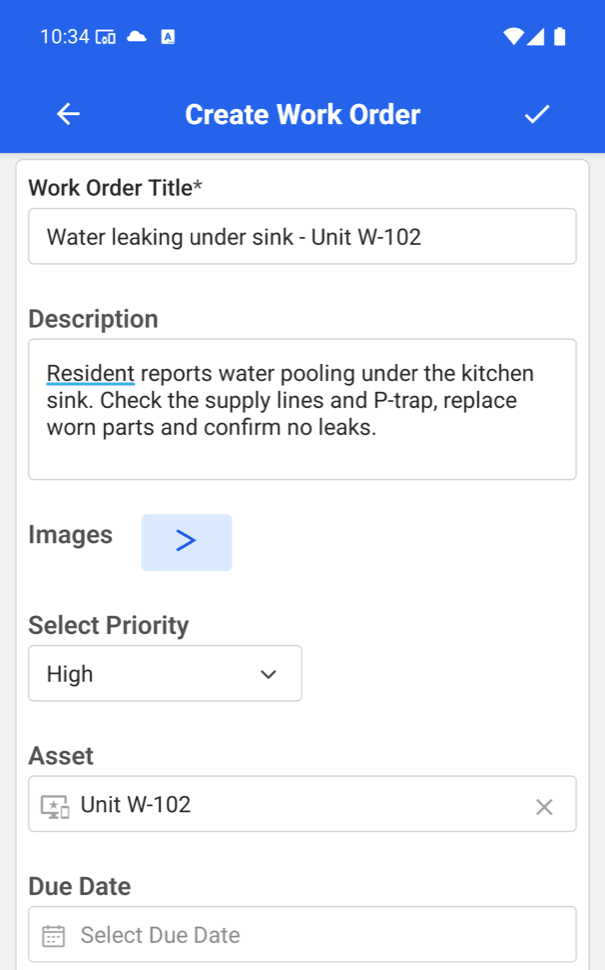
On the same screen, set a Due Date, choose the Assigned User, and optionally a team or a Checklist Template. Tap the check mark to save.
2. Everything is captured in one record
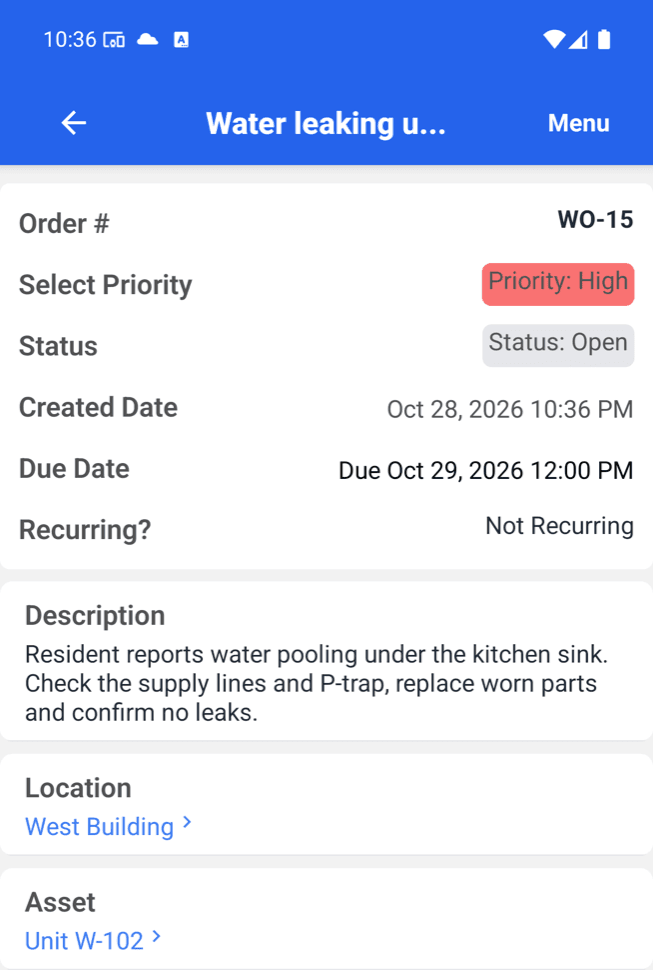
The saved work order gets its own number (here WO-15) with priority, status, created and due dates, the full description and the asset. The Location was filled in from the asset automatically, so nobody has to type it twice.
3. Technicians see it and update it on the go
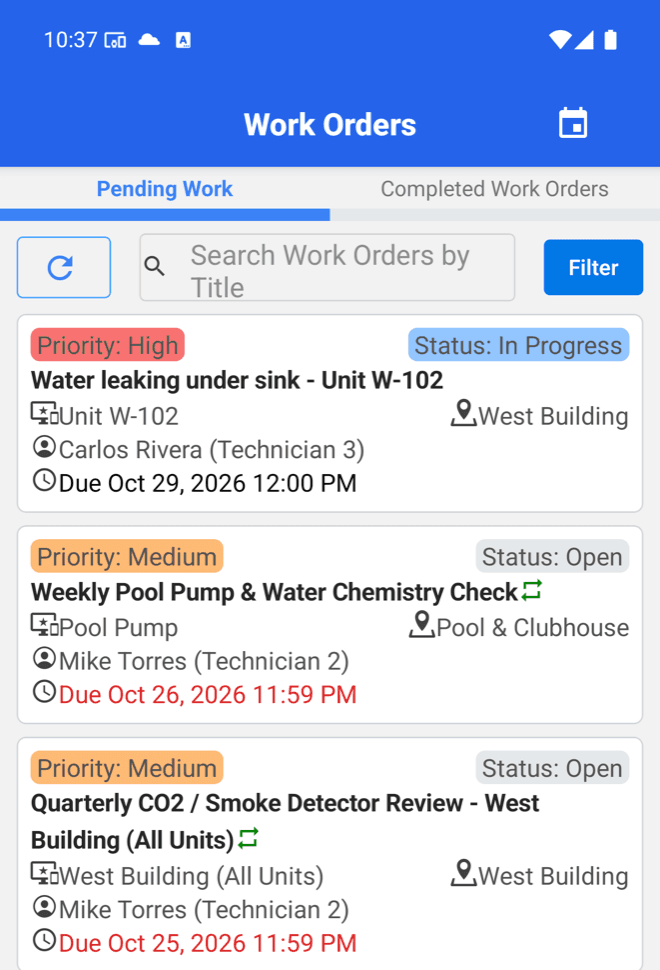
The job shows up in the technician's Work Orders list with the priority, asset, location, assignee and due date. When they start, they tap Update Status and choose In Progress, then On Hold or Completed as the job moves along.
4. The office sees it instantly
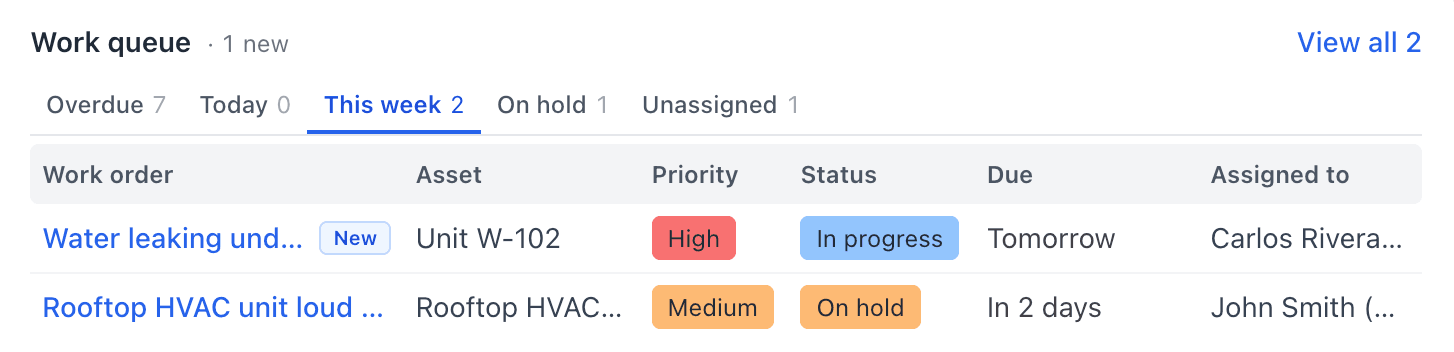
Managers don't need to call for updates. The Work queue on the web dashboard flags the job as New, with its status, priority, due date and assignee, and its tabs (Overdue, Today, This week, On hold, Unassigned) show what needs attention.
Questions people ask
What do I need to fill in to create a work order?
Only a title. Description, priority, asset, due date, assignee, team, photos and checklist are all optional, so you can log a job in seconds and add detail later.
Can technicians create and update work orders from their phone?
Yes. The MaintainNow mobile app lets technicians create work orders, see the ones assigned to them, and change the status to In Progress, On Hold or Completed.
Can I attach photos to a work order?
Yes. The work order form has an Images field for photos of the problem.
Can a work order repeat automatically?
Yes. The form's Repeating (PM Work Order) option turns it into recurring preventive maintenance. For full schedules, see Automate Preventive Maintenance in 5 Minutes.
How do managers keep track of open work?
The Home dashboard's Work queue groups work orders into Overdue, Today, This week, On hold and Unassigned, and marks newly created ones as New.
Put every repair on the record
Your team can be logging and closing work orders in minutes, not weeks. Start free with MaintainNow →
Set this up in your own facility
Start a free MaintainNow trial and follow these same steps with your own equipment.
Download the Mobile App:


✅ No credit card required • ✅ 30-day money-back guarantee • ✅ Setup in under 24 hours