Hospital Equipment Maintenance: PM Schedules, Asset History and Inspection Records
Schedule every generator test, HVAC service and elevator inspection, have technicians sign off on a phone, and pull the records when an inspector asks.
In about 15 minutes you'll have:
- Every recurring test and service (generators, HVAC, elevators, fire equipment) on its own schedule
- Technicians completing checklists on their phones, with time spent, notes and a signature
- A locked record of every inspection, kept on each piece of equipment
- A list of completed work you can export to PDF or CSV when someone asks for proof
Set it up with your own equipment list today.
Picture this: an inspector asks to see the last three months of emergency generator tests. Instead of digging through binders, you open the generator in MaintainNow and every weekly test is there: who did it, when, the run hours, each checklist answer and the technician's sign-off.
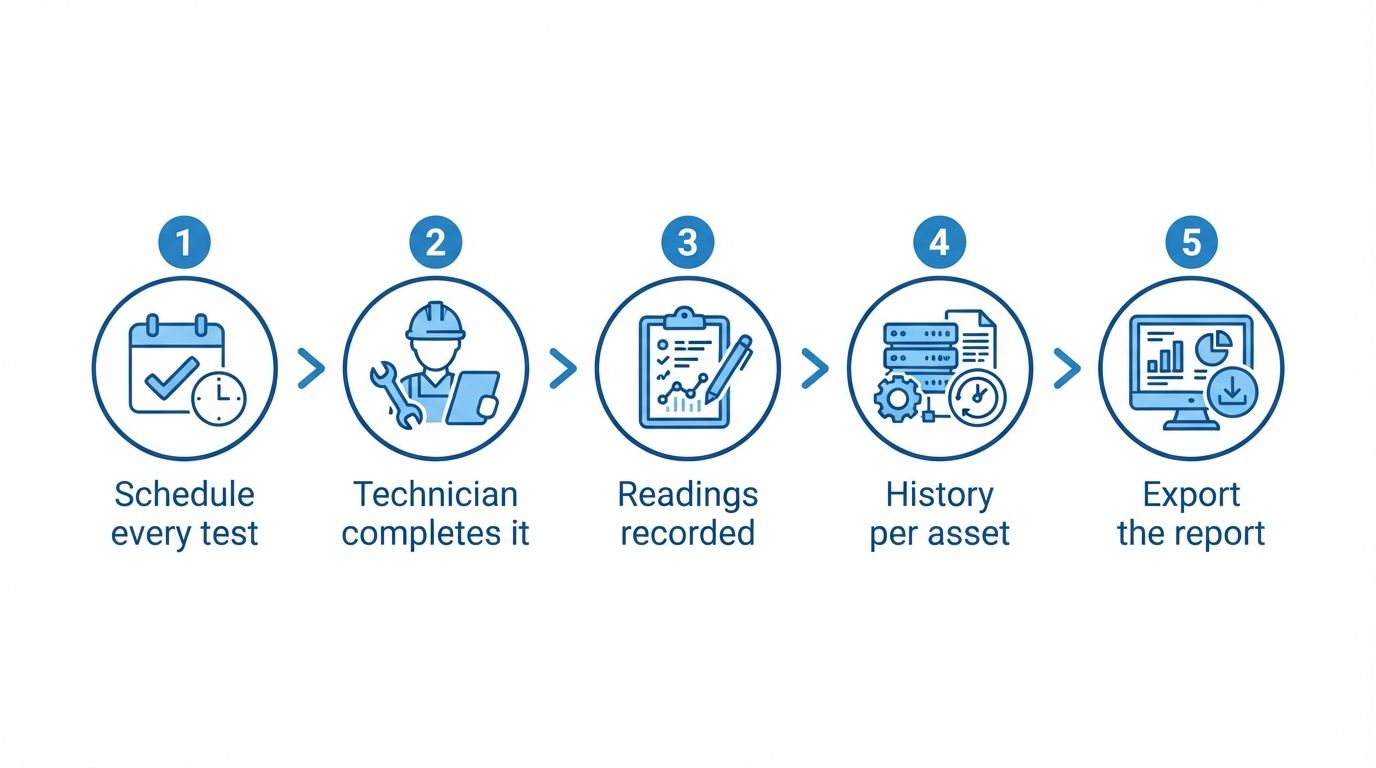
Illustration: how hospital equipment maintenance records build up in MaintainNow.
What hospital facility teams usually schedule
Your list will follow your manufacturers' manuals, your local codes and your accrediting body. These are the recurring jobs facility teams most often track:
- Emergency generators: weekly run tests, monthly load tests, battery and fuel checks, run-hour based services
- Automatic transfer switches: transfer tests alongside the generator test
- HVAC and air handlers: filter changes, belt and coil checks, temperature readings
- Elevators: monthly in-house checks between contractor visits, plus the annual inspection
- Fire safety equipment: monthly fire extinguisher inspections, alarm panel checks
- Water systems: pumps, backflow preventers and boilers
MaintainNow doesn't decide which tests you need. It makes sure the ones you choose happen on time and are recorded.
Before and after
Without a system, test logs live in binders in the plant room and on spreadsheets that only one person updates. Tests get missed when that person is off, and preparing for an inspection means a week of collecting paper.
With MaintainNow, each test has its own schedule and creates its own work order. Technicians complete them on their phones, and every result stays on the equipment's record. When someone asks for proof, you open the asset or export the list.
1. Put every test on a schedule
In Maintenance Plans, create one plan per recurring test: weekly for the generator run test, every 3 months for HVAC, yearly for the elevator inspection. Attach a checklist and a technician to each. The list shows who owns each plan and when it's next due.
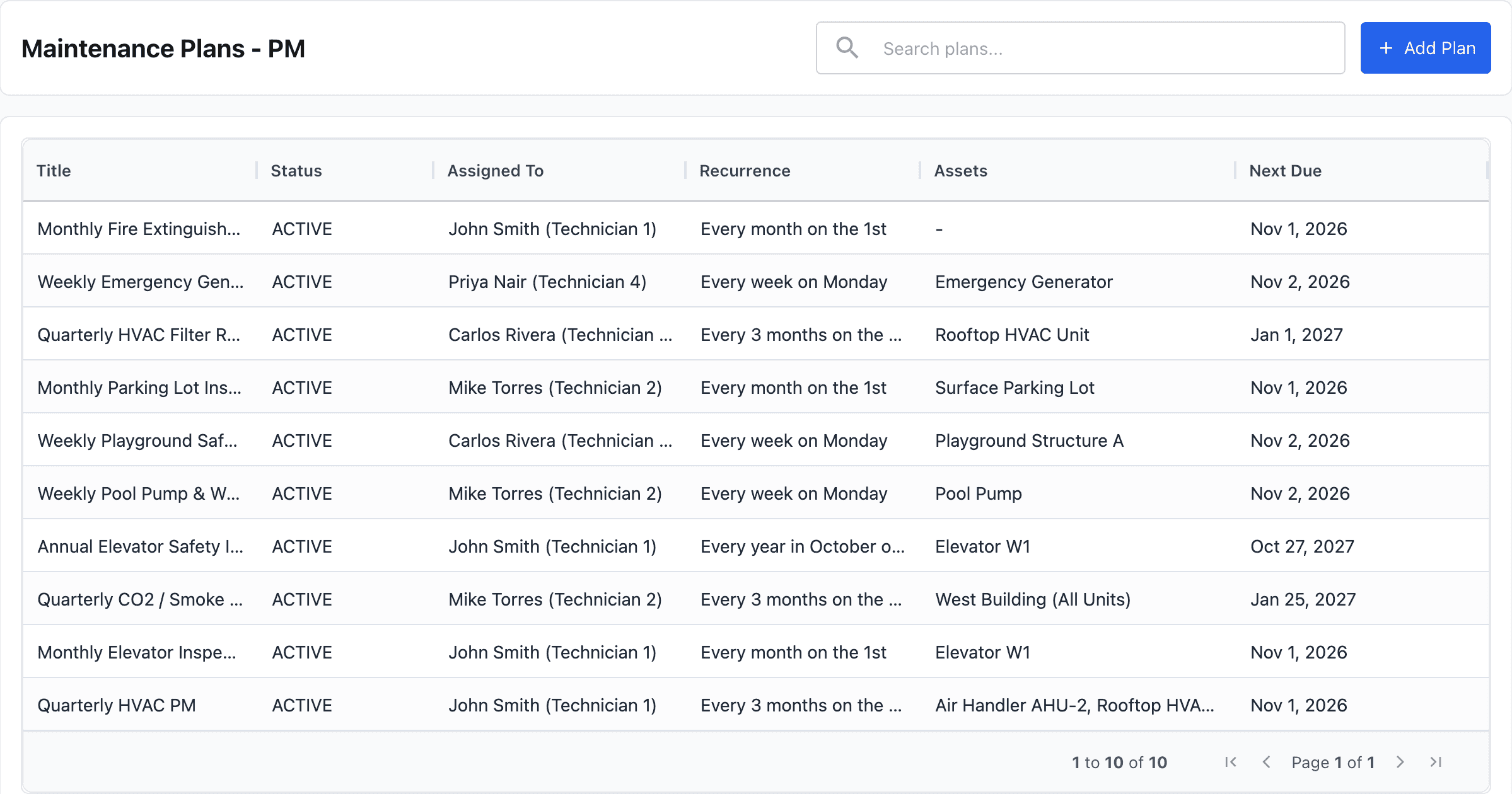
The assigned technician gets a push notification and an email each time a plan creates a work order.
2. Technicians sign off on their phone
The technician works through the checklist in the MaintainNow mobile app, then completes the work order with Total Time Spent, Completion Notes and an optional Customer Signature.
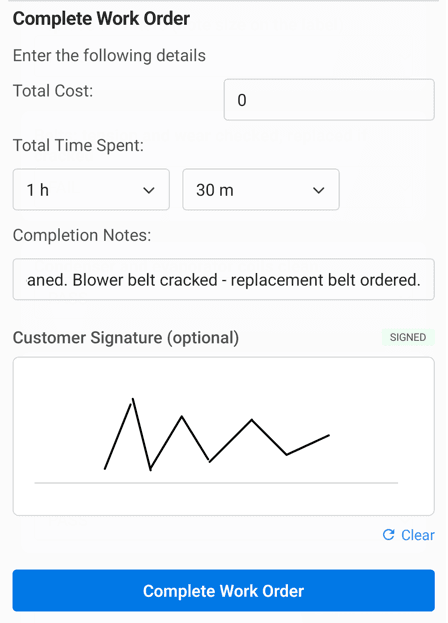
3. Keep a record that can't be quietly changed
Once a work order is completed, its checklist locks: "Checklist is locked because the work order is completed. Reopen the work order to edit it." Every answer, including FAIL results, stays exactly as the technician recorded it.
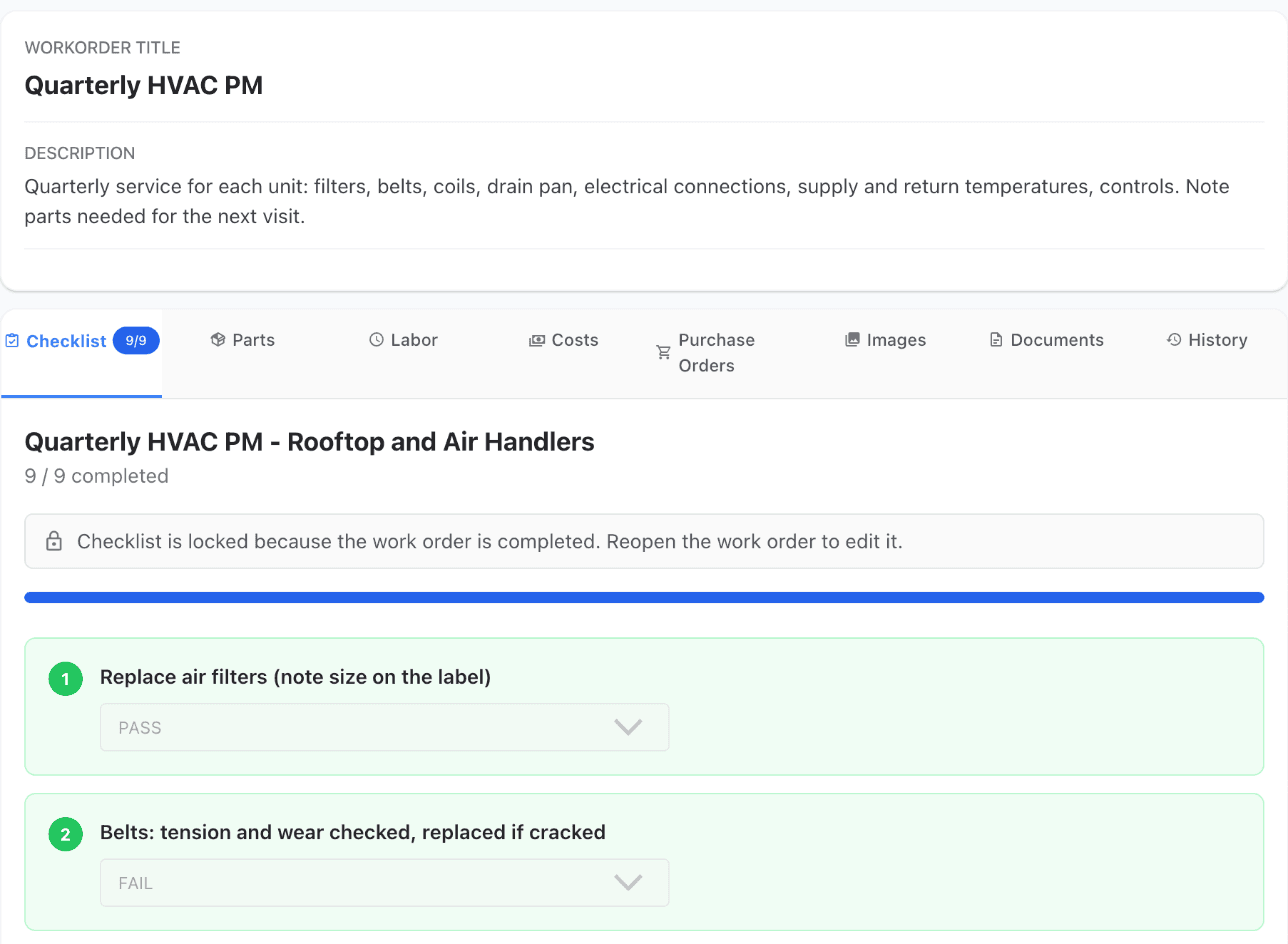
4. See every reading and test on the equipment
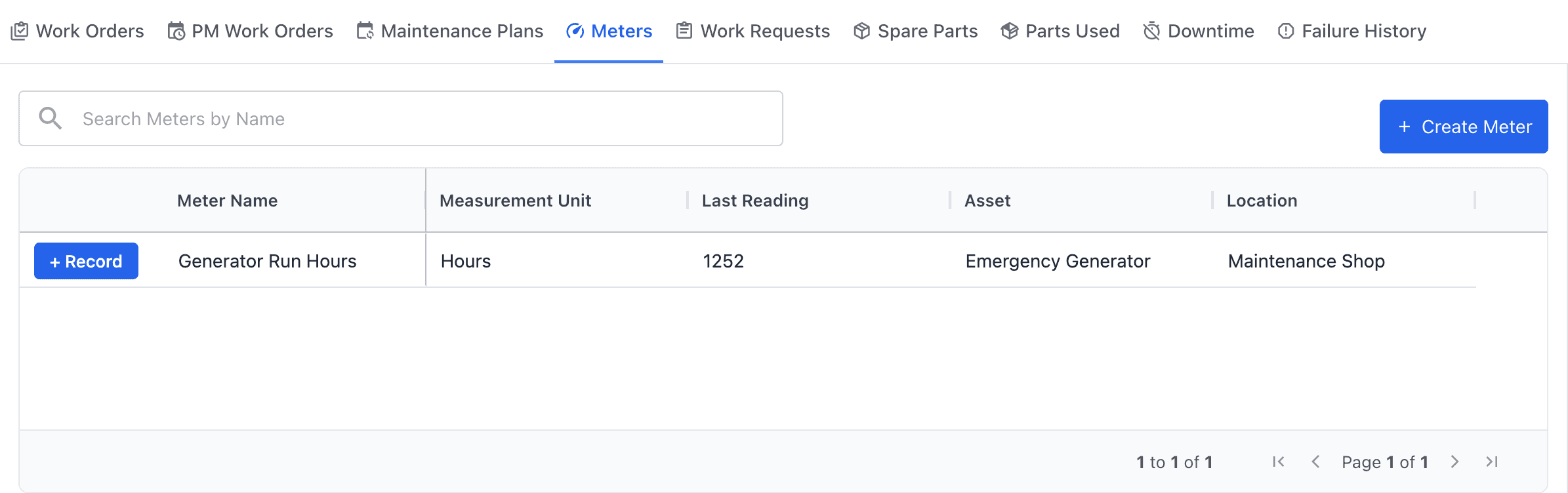
Each asset has tabs for Work Orders, PM Work Orders, Maintenance Plans, Meters, Work Requests, Parts Used, Downtime and Failure History. For a generator, log the run hours on its meter after each test; you can also trigger a service automatically when the hours reach a limit.
5. Export the proof
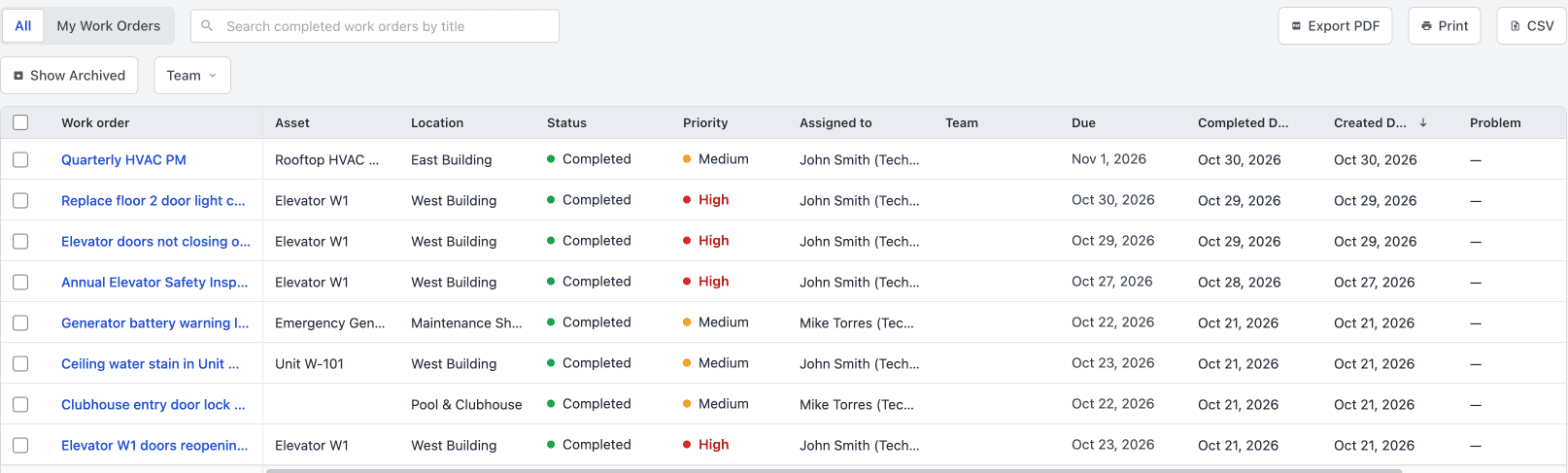
Under Work Orders → Completed Work Orders, you see every finished job with its asset, location, technician and completed date. Use Export PDF, Print or CSV to hand it over.
Questions people ask
Can MaintainNow schedule hospital generator testing?
Yes. Create a maintenance plan that repeats weekly (or monthly) for the generator, attach your test checklist and assign a technician. MaintainNow creates the work order on schedule and notifies them.
Can technicians sign off on inspections from a phone?
Yes. When they complete a work order in the MaintainNow mobile app, they can add time spent, completion notes and a signature.
Can completed inspection checklists be edited later?
Not without reopening the work order. When a work order is completed, its checklist locks. Someone has to change the work order's status back before any answer can be edited.
Can I export maintenance records for an audit?
You can export the Completed Work Orders list to PDF or CSV, or print it. Each work order also keeps its checklist answers, notes and signature.
Does MaintainNow make my hospital compliant?
No software makes you compliant on its own. MaintainNow schedules the tests you choose, reminds the right people and keeps the records. Which tests you need and how often comes from your codes and your accrediting body.
Related guides
- Meter-based preventive maintenance work orders
- Track equipment maintenance history with QR codes
- HVAC preventive maintenance checklist (free template)
- Maintenance KPI dashboard and reports
Be ready the next time someone asks for records
Add your critical equipment, set up the recurring tests once and let the records build themselves.
No credit card needed.
Set this up in your own facility
Start a free MaintainNow trial and follow these same steps with your own equipment.
Download the Mobile App:


✅ No credit card required • ✅ 30-day money-back guarantee • ✅ Setup in under 24 hours