Track Spare Parts Inventory with Low-Stock Alerts in MaintainNow
Know what's on the shelf, what's reserved for jobs and what's running low. Technicians log parts from their phone and MaintainNow flags low stock.
Picture this: the elevator's door sensor fails for the second time in a week. Your technician grabs the last spare from the storeroom, logs it on the work order from their phone, and before they're back at the elevator, MaintainNow has flagged that the sensor is below its minimum. Nobody finds an empty shelf next time.
In about 10 minutes you'll have:
- Every spare part tracked by location, with its shelf and bin, cost and stock level.
- Parts logged from the phone right on the work order, with live stock shown as technicians pick.
- Reserved and available stock that updates as work orders use parts.
- Low-stock alerts on your Home dashboard the moment a part drops to its minimum.
There's a free plan, so you can try it with your own storeroom today.
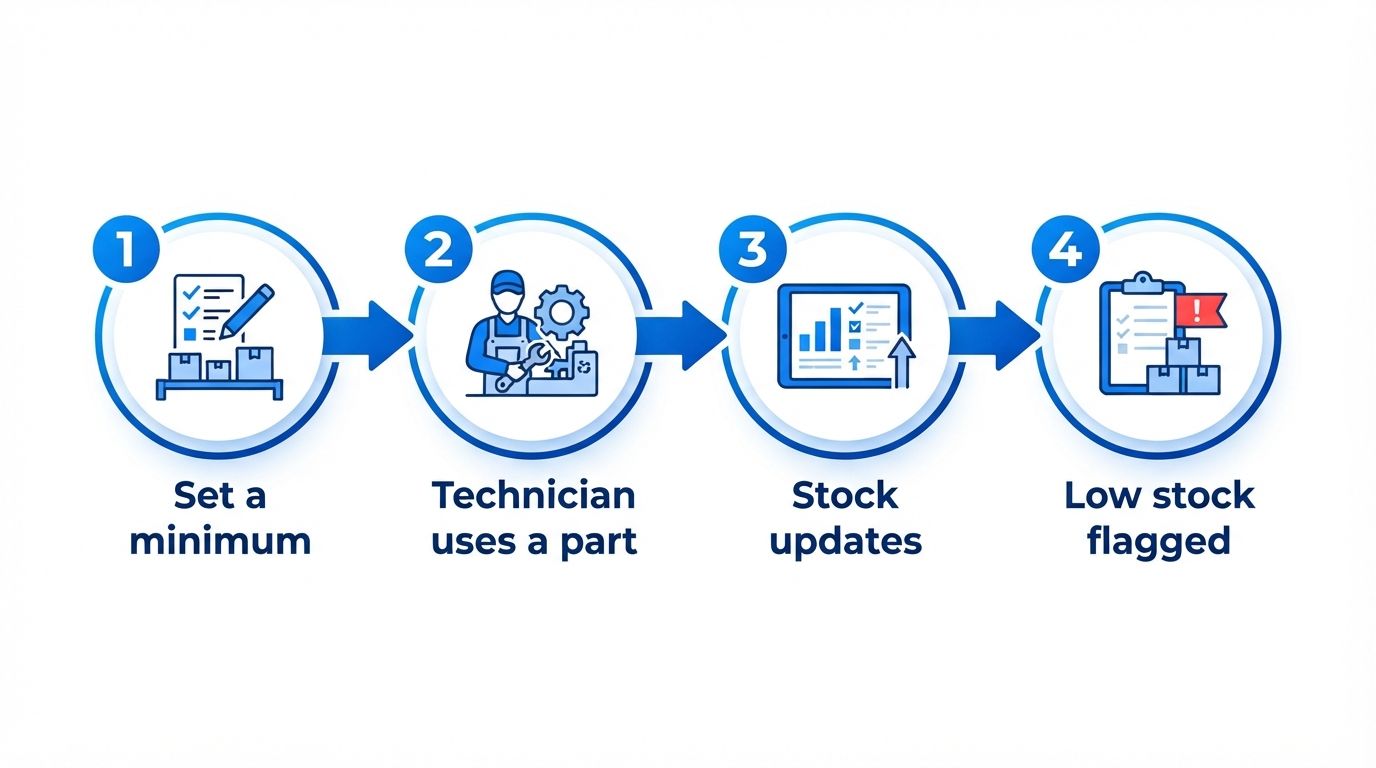
Illustration: how a part used on the job turns into a low-stock alert.
Before and after
Without inventory tracking, stock lives on a clipboard or in someone's head. Parts get used and never written down, the shelf is empty when a machine breaks, and rush orders and downtime follow.
With MaintainNow, every part has a stock level, a minimum and a place on the shelf. Technicians record what they use on the work order, stock updates by itself, and low stock is flagged before it becomes an emergency. That's inventory management without the spreadsheet.
1. Add your parts and set a minimum
Open Parts Inventory and click Add Part & Inventory. Give the part a name, Part Number / SKU, Manufacturer, Category, Unit of Measure and Cost. MaintainNow creates a QR code for every part, which you can download to label shelves and bins.
Then click Add Inventory to say where it's stored: the Stock Location, Quantity in Stock, the Minimum Quantity that triggers a low-stock alert, an optional Maximum Quantity, and the Bin Location (aisle, row or shelf, and bin) so anyone can find it.
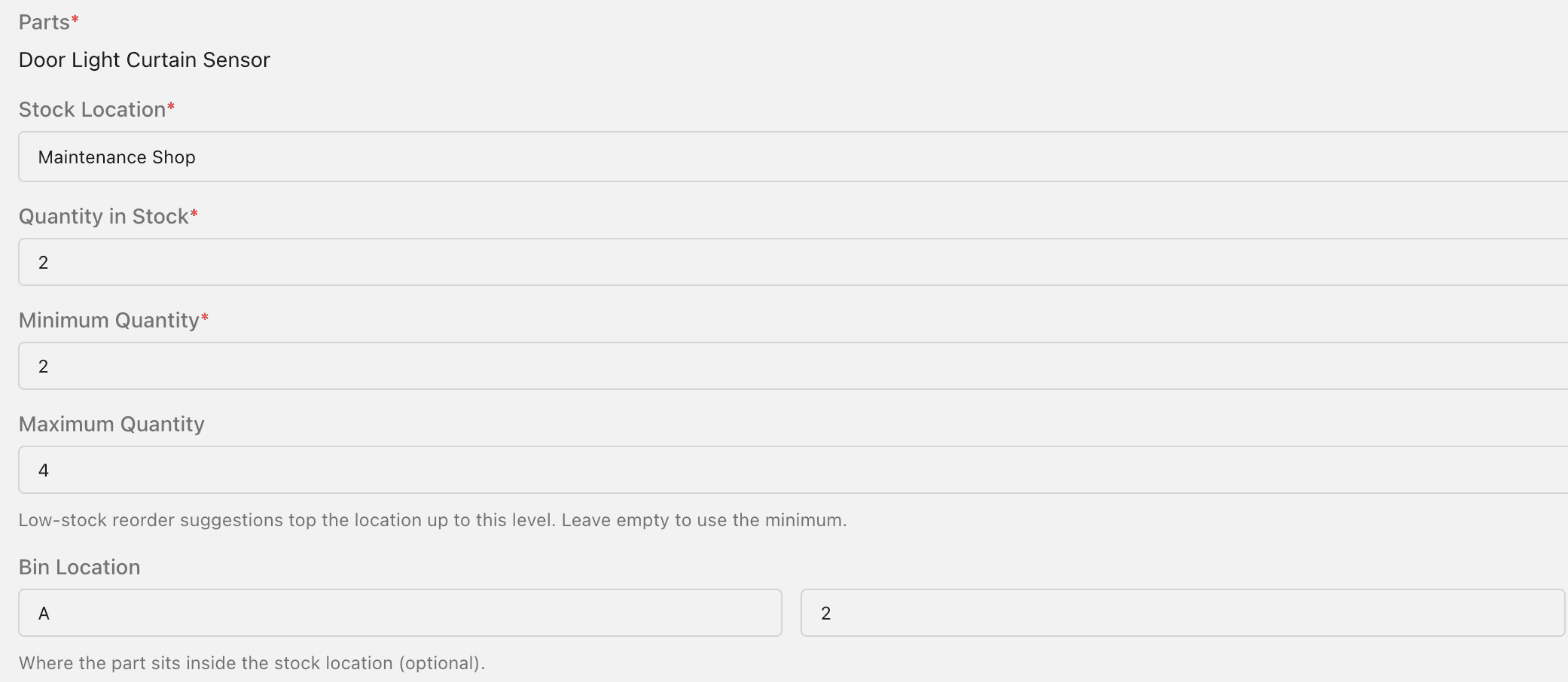
The same part can be stocked at several locations, each with its own quantity and minimum. You can also link a part to the assets that use it under Used on Assets, which builds each machine's spare parts list (bill of materials).
2. Technicians log parts from their phone
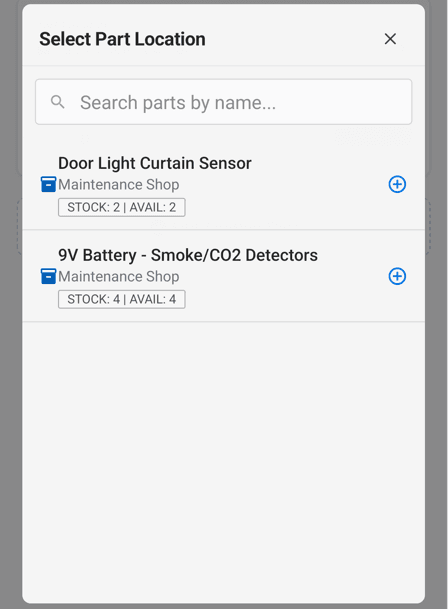
On the work order in the MaintainNow app, the technician opens Parts used and taps Add Part. The picker shows each part with its location and live STOCK and AVAIL counts, so they know it's there before walking to the storeroom.
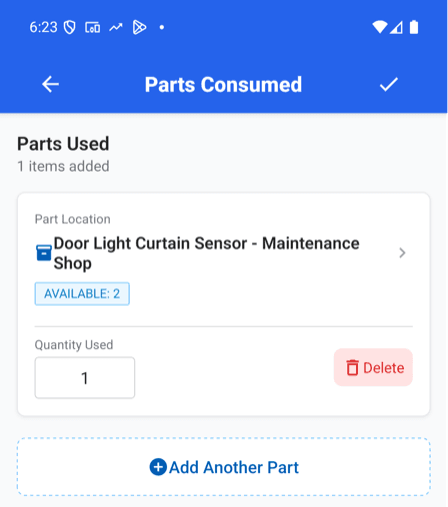
They enter the Quantity Used and save.
3. Stock updates by itself
The part is now Reserved for that work order, and Available drops to match. In the parts list, available stock below the minimum shows in red. When the work order is completed, the reserved parts are counted as used.

Every change is recorded in the part's Part History (Audit Logs), and when a delivery arrives, Restock on the inventory row adds it back in one step.
4. Low stock shows up on your dashboard
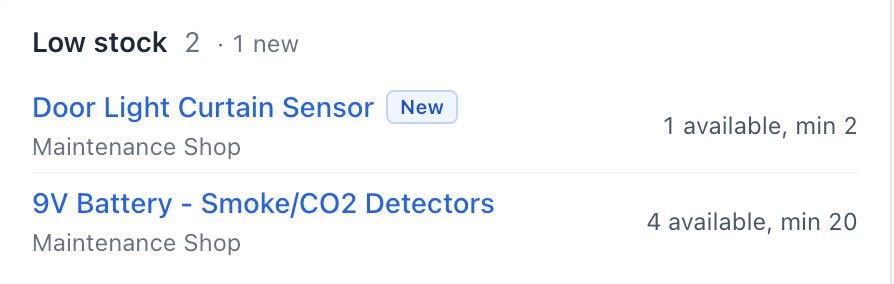
The Low stock card on the MaintainNow Home page lists every part at or below its minimum, with how many are available. Newly low parts get a New badge, so you see them the same day.
Questions people ask
Can MaintainNow track spare parts inventory?
Yes. Each part has a stock level per storage location, with a minimum, an optional maximum, a bin location and a cost.
Does MaintainNow send low-stock alerts?
When available stock falls to or below a part's minimum quantity, it appears on the Low stock card on the Home page. Available stock below the minimum also shows in red in the parts list.
Can technicians record parts used from their phone?
Yes. On a work order in the MaintainNow app, they open Parts used, pick the part (with live stock and availability shown) and enter the quantity used.
What does "reserved" mean?
Parts added to an open work order are reserved for it, so they no longer count as available for other jobs. Available stock is the quantity in stock minus what's reserved.
Can I store the same part in more than one place?
Yes. Add an inventory record for each storage location, each with its own quantity and minimum.
Related guides
- Track equipment maintenance history with QR codes
- Create and assign a work order in under a minute
- Import your asset list from Excel
Never find an empty shelf again
Start with the ten parts that would stop your building if they ran out.
Start free with MaintainNowSet this up in your own facility
Start a free MaintainNow trial and follow these same steps with your own equipment.
Download the Mobile App:


✅ No credit card required • ✅ 30-day money-back guarantee • ✅ Setup in under 24 hours